
Minimaldatensatz (DDB)
The Minimaldatensatz in Moliri
The Minimaldatensatz (minimum data set, MDS) is the recommendation of the Deutsche Digitale Bibliothek (DDB) on which details an object record needs at the very least to be published and found there. Moliri comes with version 1.2 ready to use: the fields, an input form, the check and the export as a LIDO file. The first delivery takes three steps.
| Step | Who | Effort |
|---|---|---|
| 1. Set up : map fields, create the input form | Administration | once, about a quarter of an hour |
| 2. Record : terms with authority data, close gaps | Registrars, documentation | in everyday work; legacy data once per spelling |
| 3. Check and deliver : check the file and hand it to the DDB | Documentation | a few minutes per delivery |
How Moliri meets the DDB criteria
The criteria are given as the DDB checks them in its list of software providers and networks . The film chapters open the film at the point that shows the criterion.
| DDB criterion | In Moliri | Evidence |
|---|---|---|
| Commitment to the standard | MDS 1.2 was available as a profile shortly after it was published. Future versions are added as another profile, and the institution’s mappings stay. | Section |
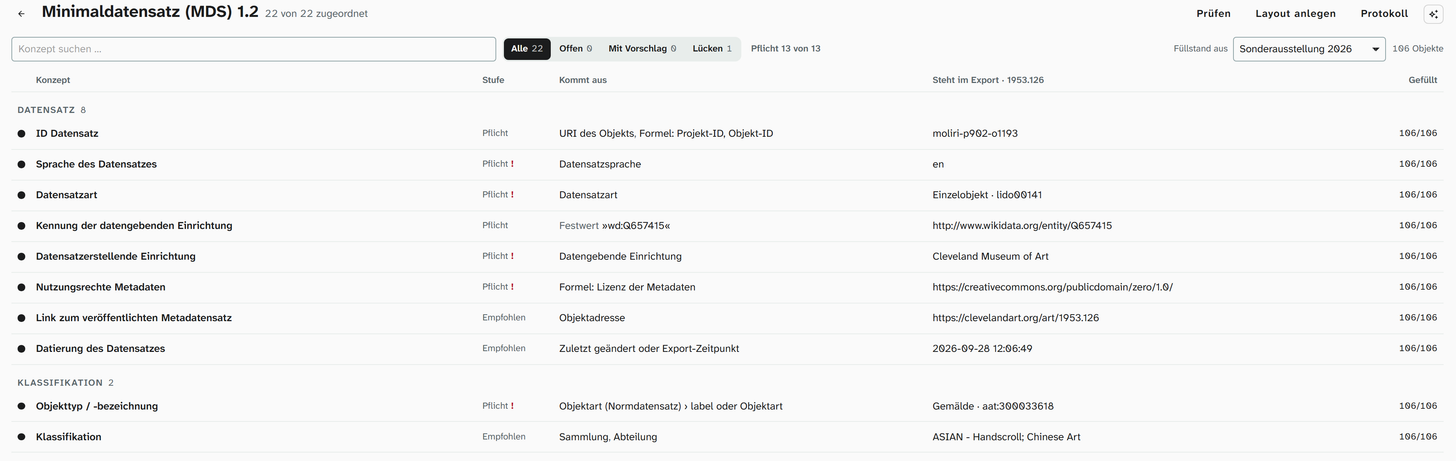
| Potentially supports all MDS data fields (cataloguing and export) | Each of the 22 concepts of the MDS is bound to an existing field or created as a new field, in one dialog. | Film chapter 1 · Image |
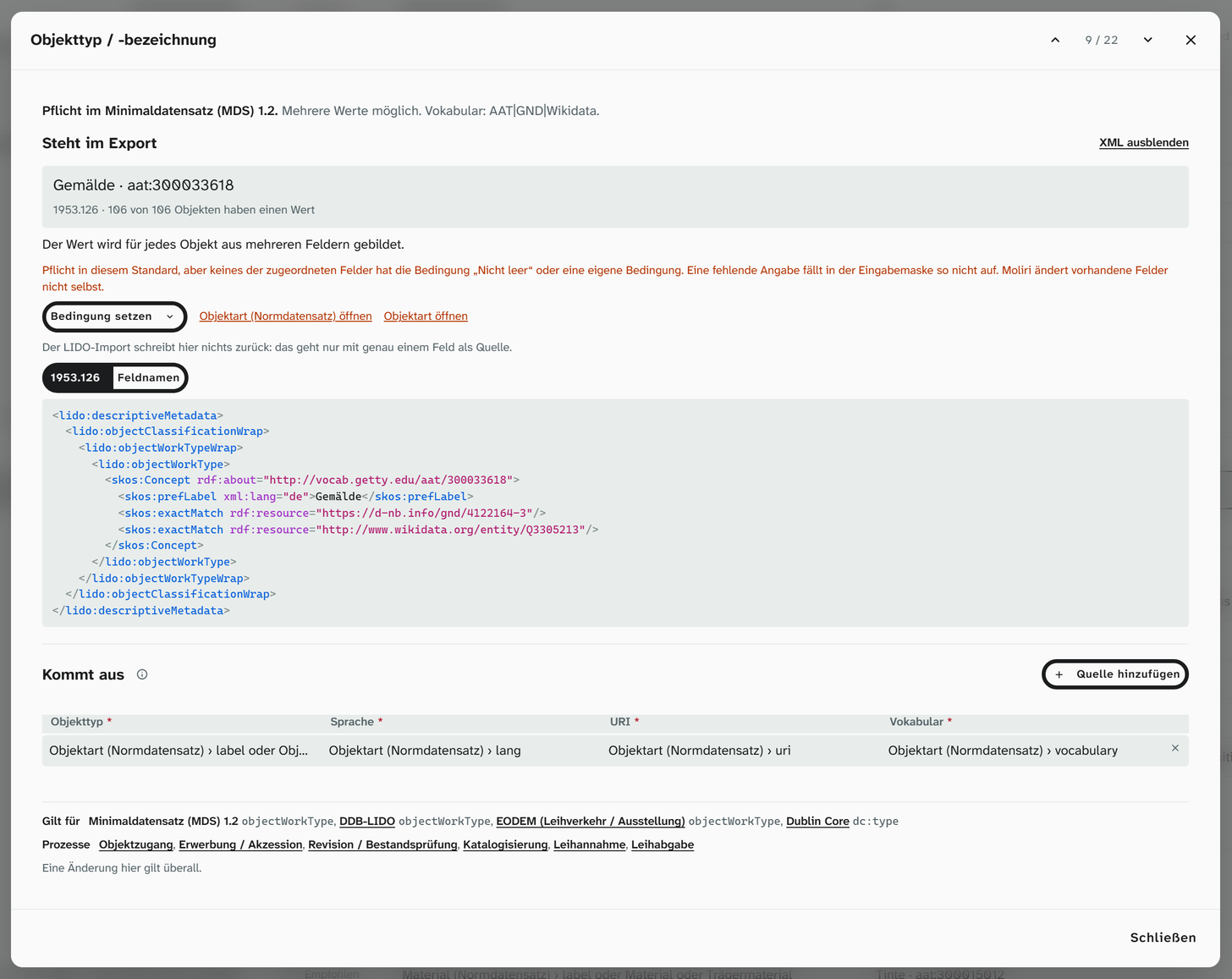
| Technically supports the use of FAIR vocabularies | Terms come with a URI from more than 20 vocabularies. For every mandatory field with a vocabulary recommendation, the recommended vocabularies are preselected. | Film chapter 2 · Image |
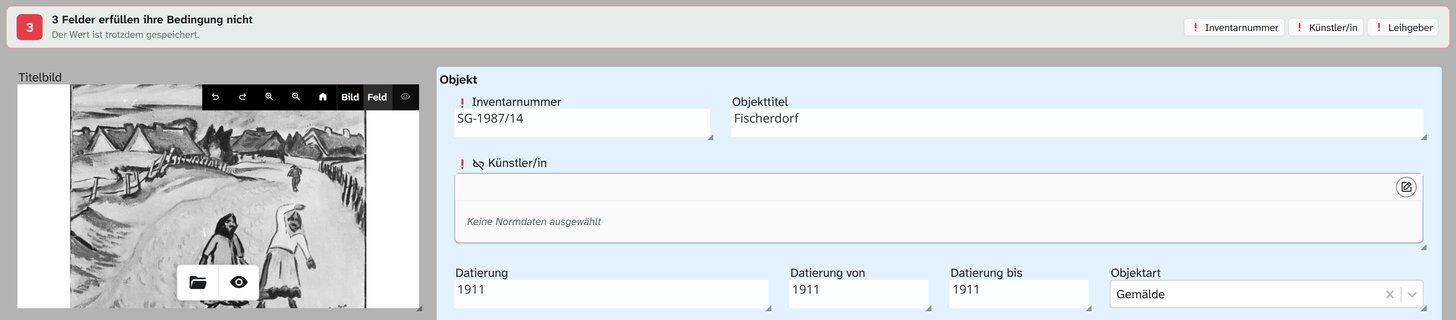
| Marks MDS-relevant data fields (cataloguing) in the regular or an existing input form | Mandatory fields are marked in every input form as long as they are empty. The URI is recorded in the authority data field. | Film chapter 3 · Image |
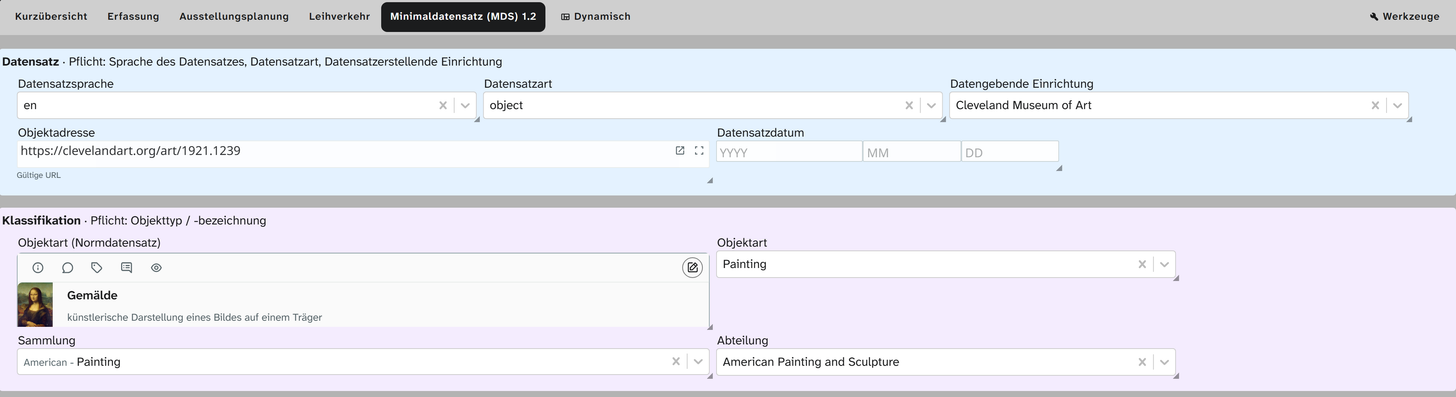
| Offers a separate MDS input form | Create layout builds it from the profile with one click. | Film chapter 4 · Image |
| Offers a valid general LIDO XML export | DDB-LIDO profile, validated against lido-v1.1.xsd before the download. | Film chapter 6 · Image |
| Offers a valid MDS XML export | MDS 1.2 profile with URIs, validated against the digiS MDS profile schema before the download. | Film chapter 7 · Sample file |
Commitment to the standard
Moliri has supported the Minimaldatensatz since July 2026, then in version 1.1. Version 1.2 was published in October 2026 and was available as a profile in Moliri on 7 October. An institution does not map its fields to the profile but to concepts such as material or object title. A future version is therefore added as another profile and uses the same mappings; you only have to map what the new version newly requires.
All MDS data fields
Under Data model › Metadata standards the Minimaldatensatz appears as a card. For each concept Moliri suggests an existing field; whatever is missing it creates in the matching field type.
FAIR vocabularies
Terms are recorded in authority data fields. As you type, the field searches the institution’s authority data library and its vocabularies at the same time; what you take over is the term with its URI. When Moliri creates an authority data field for the Minimaldatensatz, the vocabularies that the recommendation names for the concept are preselected: for the object type, for instance, Getty AAT, GND and Wikidata. Which vocabularies come with Moliri is listed under Recording with authority data .
Marking in every input form
Mandatory fields carry the condition must not be empty. If such a field is empty, it shows a red exclamation mark in every input form that contains it, and a bar above names all open fields. The record is saved anyway, so that nobody is held up in the middle of cataloguing. The URI of a term does not need a field of its own: it is stored in the authority data field, together with the label.
A separate MDS input form
Create layout builds an input form from the profile with all mapped fields, arranged by the groups of the Minimaldatensatz. The heading of each group names its mandatory information. On the object the form appears as a tab of its own.
Valid export
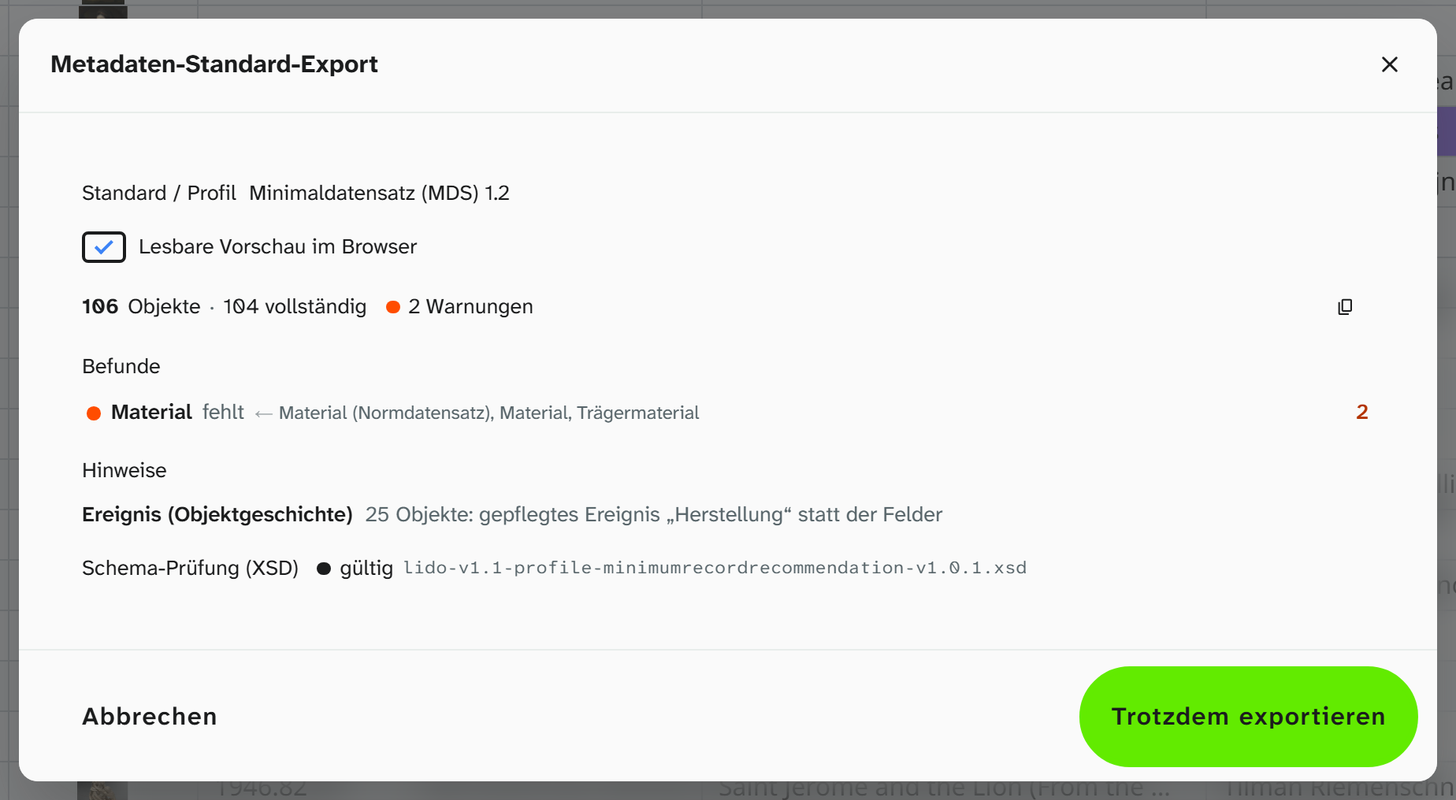
The export covers the objects in the current filter, in the profile Minimaldatensatz (MDS) 1.2 or DDB-LIDO. Before the download Moliri first checks the data and then validates the file against its schema, both in the browser. If everything is in order, the download starts straight away; otherwise a check report appears.
What Moliri does beyond that
Beyond the seven criteria, these functions help in everyday work:
| Function | What for |
|---|---|
| Completeness | Shows for the current filter which information is missing for how many objects. A click on the gap shows exactly those objects |
| Turning legacy data into authority data | Text from an old database or Excel list is matched to a term once per spelling, not once per object |
| Dimensions from free text | If the size is only there as text (“Blatt 34,5 × 47 cm”, sheet 34.5 × 47 cm), the language model suggests height, width and depth, that is, the number fields the MDS expects for dimensions |
| Schema check before the download | The file is validated against the digiS XSD before it leaves the institution, in the browser and without an external service |
| Exporting only complete objects | If only some objects lack information, the others can already go into the delivery |
| Repeated delivery | The filter for the delivery stays saved as a view. New and completed objects are included in the next export |
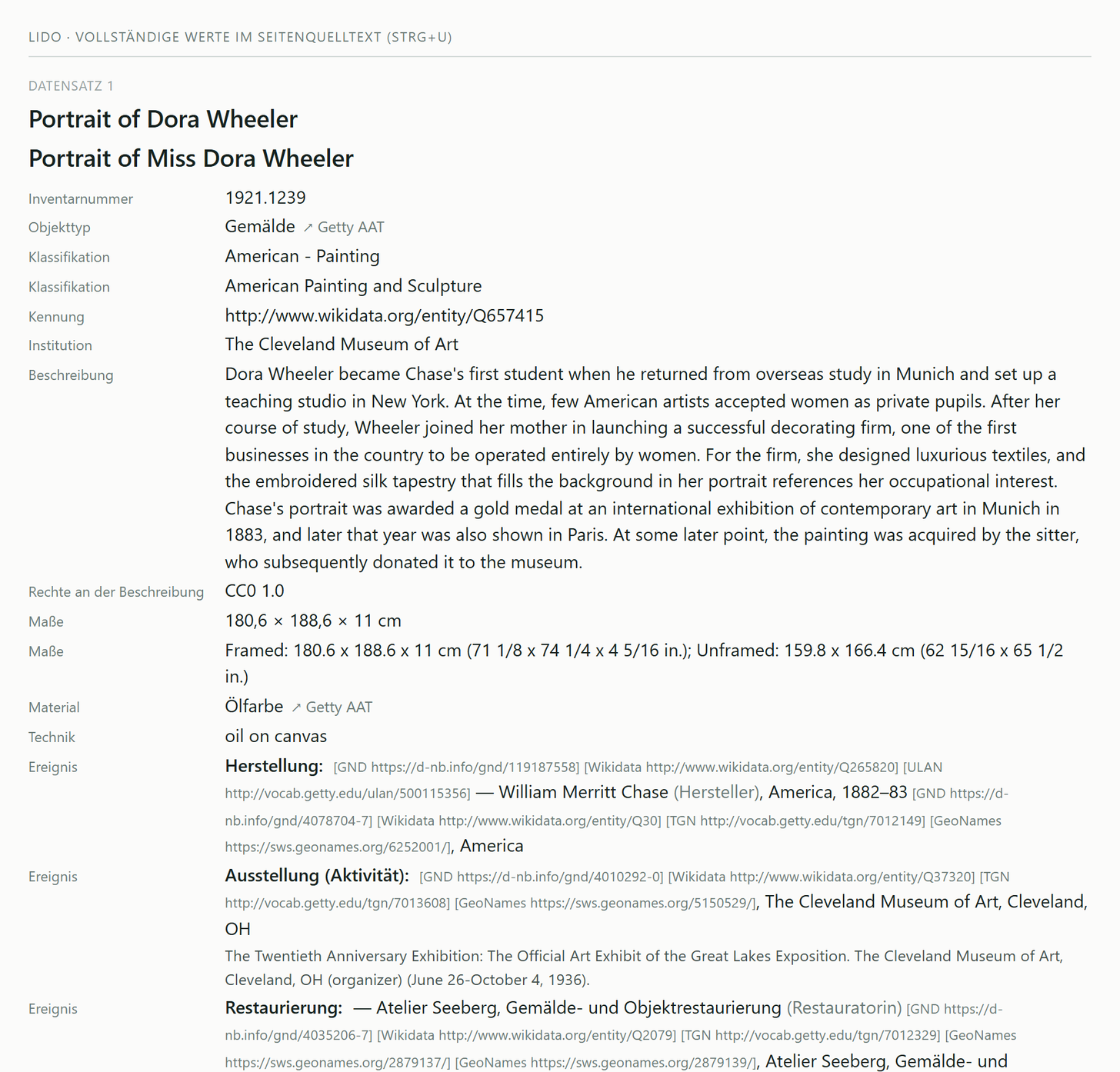
| Readable file | The XML file appears in the browser as a readable page, even when downloaded and opened locally |
| Bilingual terms | Record type, event type and dimension types appear in the file with a German and an English label |
For specialists: what is in the file
Moliri writes LIDO 1.1. The MDS 1.2 profile contains only the elements of the recommendation and is
validated against lido-v1.1-profile-minimumrecordrecommendation-v1.0.1.xsd from digiS; the DDB-LIDO
profile also contains inscriptions, marks, references and rights in the work and is validated against lido-v1.1.xsd.
| Information | In the file |
|---|---|
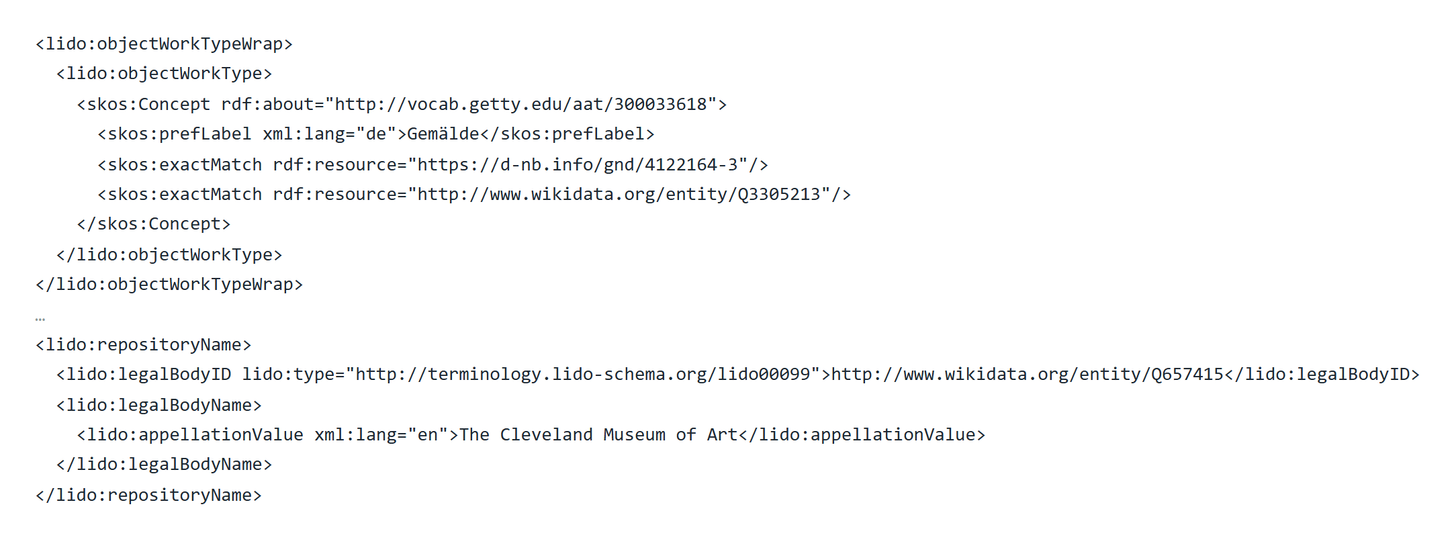
| Terms | skos:Concept with the vocabulary’s URI and the label, identifiers in other vocabularies as skos:exactMatch, as in the examples of the Minimaldatensatz |
| Persons, places, institutions | Identifier as a URI (lido:type lido00099). A bare ISIL becomes the URI of the ZDB |
| Record type, event type | Approved terms from the LIDO terminology, with German and English labels |
| Dimension types | Terms from Getty AAT, with German and English labels |
| Media file | File format and DDB media type |
| Date of the record | Last change to the object (lido:type “modified”), in Moliri the system field Last changed. In addition the time of the export (lido:type “created”), which the Minimaldatensatz recommends as a timestamp |
Sample file with five objects from the demo collection, in the MDS 1.2 profile: view in the browser . A stylesheet from moliri.app makes the records readable, even when the file is downloaded and opened locally; the source code shows the XML.
Terms
| Term | Meaning |
|---|---|
| Concept | A piece of information in the standard, such as material or object title, regardless of the field it is kept in in Moliri. The institution binds each concept once to its fields; all standards read from there |
| Profile | A selection from LIDO for one purpose, with its own mandatory levels: Minimaldatensatz (MDS) 1.2 or DDB-LIDO |
| Mandatory, recommended | The levels of the Minimaldatensatz. Every record needs the mandatory information; recommended information makes it richer and easier to find |
| Authority data field | Field type for terms with a URI from a vocabulary, see Authority data field |
| Input form | The arrangement of the fields on a tab of the object. The interface calls it Layout |
Instructions
| Step | Who | Page |
|---|---|---|
| Map concepts, create fields and the input form | Administration | Set up the input form |
| Record with authority data, find gaps | Registrars, documentation | Recording with authority data |
| Check the file and deliver it to the DDB | Documentation | Check and deliver |