
Metadata standards
Import LIDO
A LIDO file brings records from other collection software, from a portal or, as an EODEM file, from a
lender. Moliri reads both forms in which collection systems write terms (skos:Concept or lido:conceptID with lido:term), whatever prefix the file uses.
The import writes into fields that already exist. Moliri takes the field for each concept from the mappings made in the setup. Where a mapping reads from several fields, for example first from the authority record and then from a text field, the first suitable field is offered as a suggestion. How the setup prepares this: Set up the LIDO import .
-
Open the import. Sidebar, tab Data In- & Export, under Import, Metadata standard (LIDO).
-
Choose LIDO XML file. Moliri reads the file in the browser and gives the number of records. Under Mapping each concept that occurs in the file is listed with its target field.
-
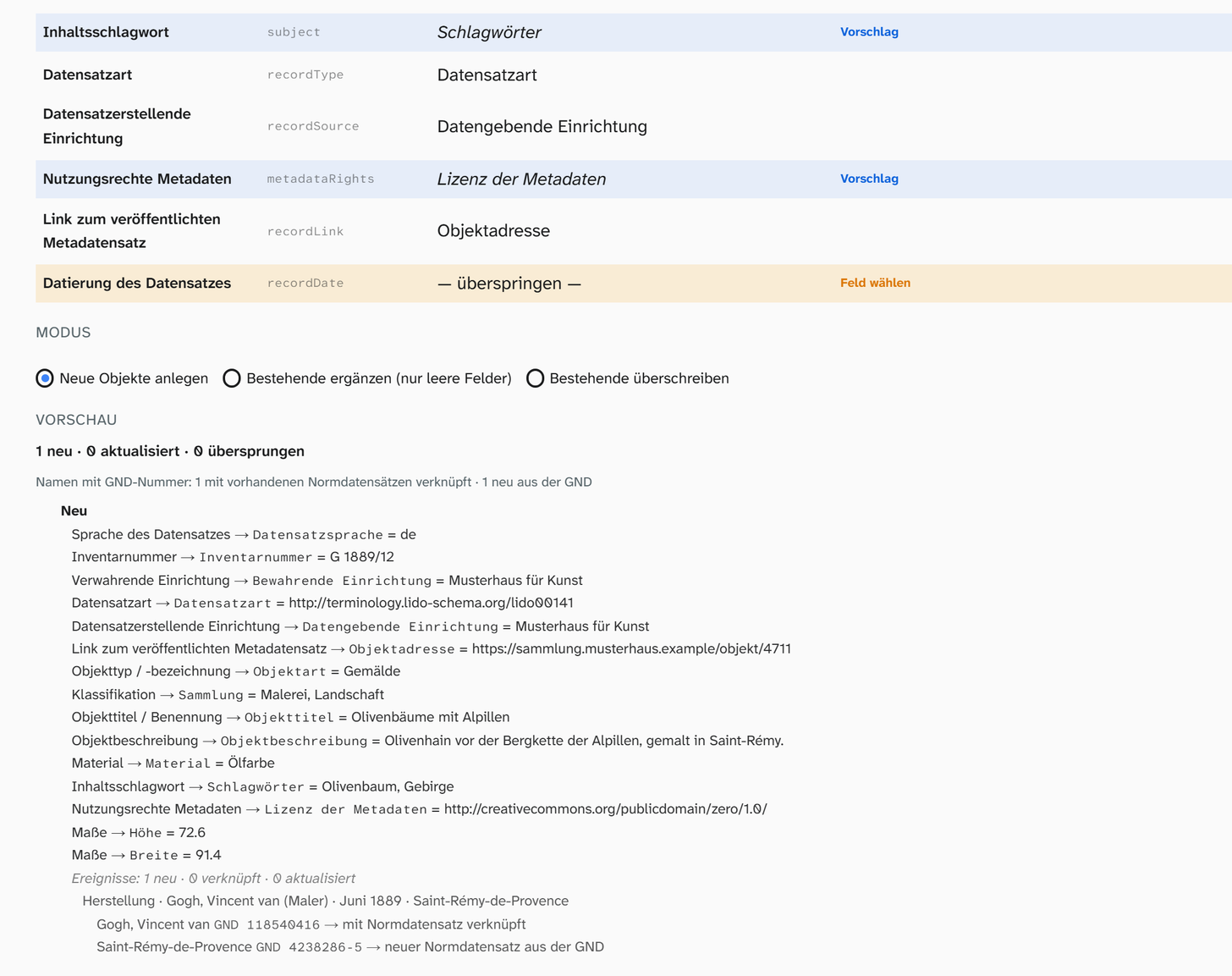
Check the mapping. Preset target fields can be changed. Rows marked Suggestion have a blue background: the field comes from a mapping with several sources, such as title, object type or material. Check that it fits; left unchanged, it is imported as shown. Rows marked Choose field are set to skip until you choose a field. Set a concept you do not want to take over to skip.
-
Choose the mode: Create new objects, Fill existing (empty fields only) or Overwrite existing. When filling or overwriting, choose the Match field, usually the inventory number. Create unmatched as new creates records without a match as new objects.
-
Read the preview. For each record it shows whether it is created, updated or skipped, which value goes into which field and which events are created, each with type, people, date and place. Below an event, every person and place with a GND number shows what the import does with it: linked to authority record, new authority record from the GND or, when several authority records carry this number, stays text. Above the list is the count for each case.
-
Import. The message gives the number of imported objects and, if there are any, values or events that were not written.
What arrives
| In the file | In Moliri |
|---|---|
| Title, inventory number, description, inscription, holding institution, record details | The text in the chosen field. Of several titles the preferred one counts, otherwise the one in the record’s language |
| Terms such as object type, classification, material, technique, subject | The term as text (lido:term or skos:prefLabel), without a term the identifier. Several terms go into one field, separated by commas |
| Record type and rights | The identifier (URI), because that is the actual statement there |
| Measurements | With the choice Into the measurement fields, in the fields mapped per measurement type to the concept Measurements in the setup (such as height, width, depth, weight), converted into the field’s unit: 726 mm become 72.6 cm. A measurement with another extent, such as the frame, only goes into a field for that extent. Instead of the measurement fields, the text of all measurements can go into a field of your choice |
| Event with a known type | An event on the object, with people and their role, date, place, name, materials and technique, period, culture and description |
| Person or place with a GND number | The name as text on the event, linked to the authority record that carries this number. If there is none yet, the import creates one with the number and the name from the file; dates of life and further details come from the GND through syncing with the source . If several authority records carry the number, it stays text |
| Event measurement, such as the insurance value of a loan (EODEM) | A row of its own, Event measurement: …, in the mapping; with a chosen field, the number goes there |
| Typed event note, such as handling instructions (EODEM) | A row of its own, Event note: …; with a chosen field, the text goes there |
Event types
An event is created when its type matches an existing event type. Moliri first compares the identifier
in the file with the LIDO identifier of the event types, such as lido00007 for production, also in
the older form …/eventType/production. If none matches, the name counts: the event type’s name in
Moliri or the official name in the LIDO terminology, in German or English (Herstellung, Production). How event types get their LIDO identifier is described under Events .
An event without a matching type is skipped, together with its people, date and place. The preview gives the number of such events and their types.
Dates
The display form (June 1889, c. 1900) arrives as text. Earliest and latest date become dates; a year alone or a year and month stay incomplete (1889, 1889-06). Dates before the common era and free text in this place stay empty.
Names, images and measurements without a number
| In the file | How it comes into Moliri |
|---|---|
| People and places without a GND number, for example with only a TGN or in-house identifier, and names whose GND number several authority records carry | The name is on the event as text. You link it to an authority record in the event afterwards |
Images and other media (resourceWrap) | Through the batch file import , which assigns files to objects by their names |
| Measurements with a unit that cannot be converted, or without a number | In the text of the measurements: map Measurements to a field instead of the measurement fields |
A file from another system almost always meets differences. The first run belongs in an empty project, with the mode Create new objects and a few records. There you see what arrives and clear it away without consequences.
Further reading
- Bring your collection over from other software : all routes at a glance
- Set up the LIDO import : which mappings the import uses by itself
- Export LIDO : the opposite route