
AI in Moliri
AI account
The AI account tells Moliri which language model it can ask. You set it up under Settings, section Data, AI account. Only administrators (status 9) can change it.
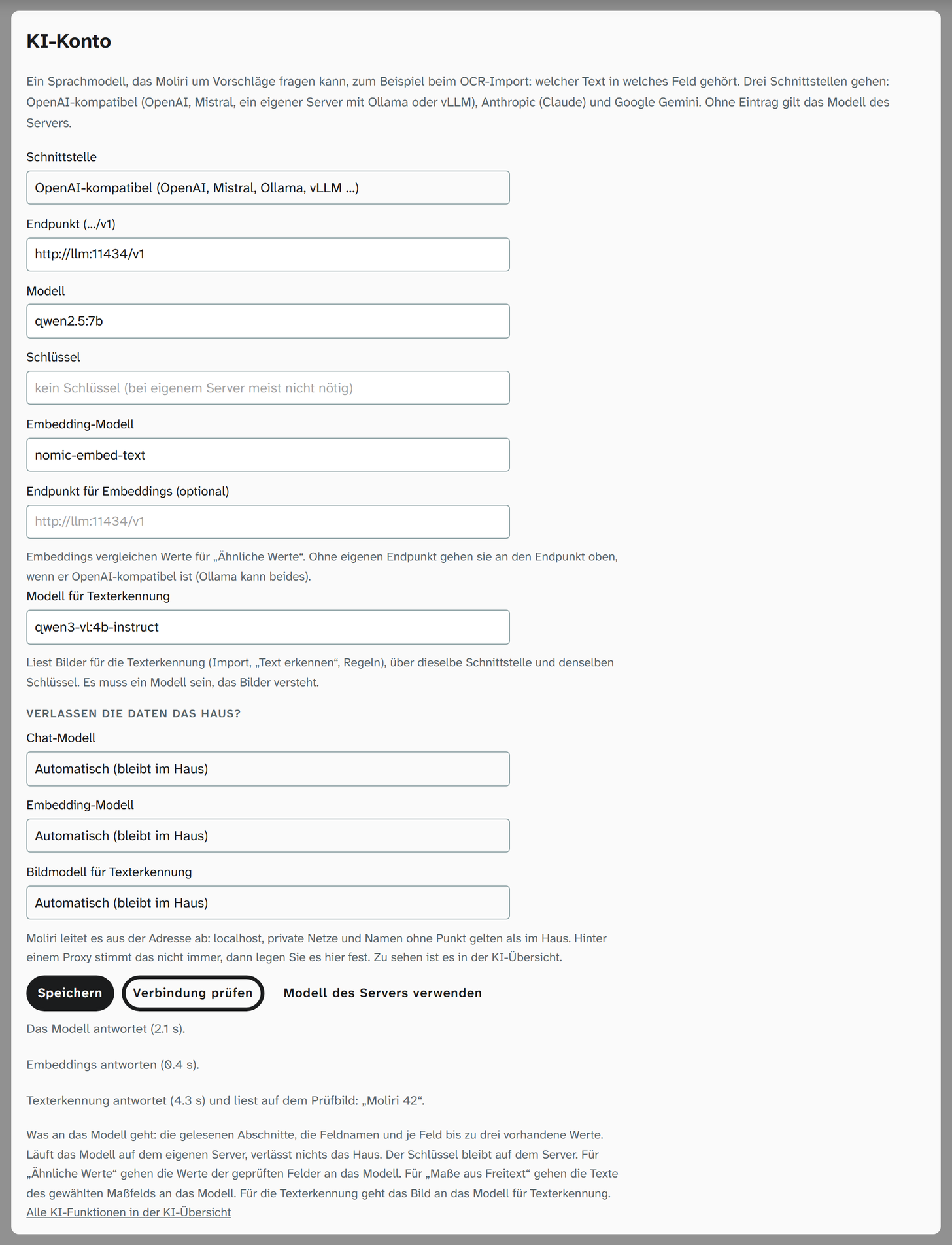
Settings
| Setting | Meaning |
|---|---|
| Interface | OpenAI-compatible (OpenAI, Mistral or a server of your own with Ollama or vLLM), Anthropic (Claude) or Google Gemini |
| Endpoint | With OpenAI-compatible, the address of the interface, ending in /v1. With the others, leave it empty for the provider’s address |
| Model | Name of the model at the provider or on your own server |
| Key | The provider’s access key. A server of your own usually needs none. A saved key stays on the server; leaving the field empty keeps it |
| Embedding model, Endpoint for embeddings | Only for the AI run under Similar values on the Check tab |
| Model for text recognition | A model that understands images, through the same interface and with the same key. It reads for text recognition by the AI service : in the OCR import, with Recognise text on the Text tab and in rules. Without this model, the AI service does not appear anywhere in text recognition |
| Does the data leave the house? | For each account (chat model, embedding model, image model for text recognition) Automatic, Runs in the house or External. Automatic derives it from the address and gives the result in brackets; behind a proxy that is not always right. You can see it in the AI overview |
Test connection and save
Test connection asks the model with the details in the form, even unsaved, and gives the response time or the provider’s message. If a model for text recognition is entered, it reads a small test image with the words “Moliri 42”; the page shows what it has read, for example Text recognition answers (4.3 s) and reads on the test image: “Moliri 42”. Save stores them. Remove key deletes the key, Use the server’s model deletes the whole account. The AI overview in the profile offers the same test for a single saved account.
Without an entry, the model that the server brings through its environment applies (MOLIRI_AI_PROVIDER, MOLIRI_AI_URL, MOLIRI_AI_MODEL, MOLIRI_AI_KEY, for text recognition MOLIRI_AI_OCR_MODEL). The page then says The server’s model applies now.
An account saved here takes precedence.
Who uses the account
| Function | Model | Goes to the model |
|---|---|---|
| Suggest fields with AI in the OCR import | Chat model | The sections read, the field names and up to three existing values per field |
| AI run under Similar values | Embedding model and chat model | The values of the chosen fields |
| Dimensions from free text | Chat model | The text with the dimensions |
| Text recognition by the AI service | Model for text recognition | The image |
The bottom of the page also says what goes to the model. If the model runs on your own server, nothing leaves the building. If you do not want to hand the images to a provider, switch off text recognition by the AI service on the Text recognition page.
The questions to the model run as jobs on the server, one after the other with transcription and text recognition; see AI jobs and nightly runs .
Further reading
- Where the AI runs : the AI account beside the browser, Transcribe and the server
- AI overview : place, state and Test connection for each account
- Admin areas : the other settings